Introduction
Creating an SEO-friendly URL…
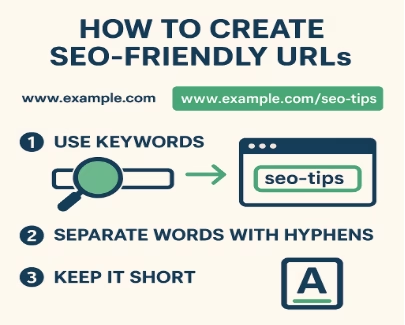
Creating an SEO-friendly URL is one of the simplest ways to boost your site’s visibility. An SEO-friendly URL is short, descriptive, and easy for both users and search engines to understand.
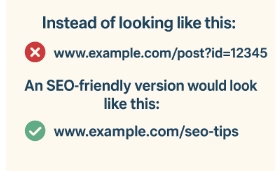
Notice the difference? The second version instantly tells both Google and the reader what the page is about: SEO tips.
When URLs are clean and descriptive, people are more likely to click on them, and Google is more likely to reward them with higher rankings.
Why an SEO-Friendly URL Matters
URLs play an important role in SEO because they act as one of the first signals search engines like Google use to understand what a page is about. Along with elements such as the title tag, anchor text, and on-page content, a well-structured URL helps determine the topic and relevance of your content. Beyond search engines, URLs also influence user behavior—messy or spammy-looking links can discourage clicks, while clean, descriptive URLs build trust and encourage engagement. As Google itself notes, URLs that include relevant words aligned with your site’s content and structure are more user-friendly. This means strong URLs not only support higher rankings but also enhance user experience, making them a vital component of SEO success
Why Are URLs Important for SEO?
Let’s go step by step through the most important rules for crafting SEO-friendly URLs.
1. Use a Keyword in Your URL
Adding your target keyword in the URL reinforces the topic of your page for search engines. When someone searches for that keyword, seeing it in the URL increases their confidence that your page is relevant.
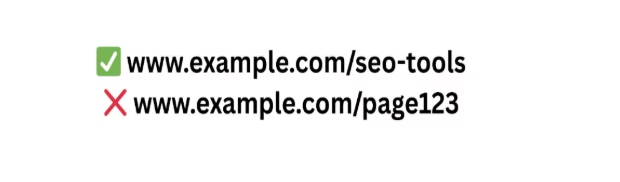
In the first example, both Google and the user instantly know the page is about “SEO tools.” In the second, the meaning is lost.
Pro Tip: Keep it natural. Don’t stuff multiple keywords into your URL—it looks spammy and can hurt your SEO.
Use Hyphens to Separate Words
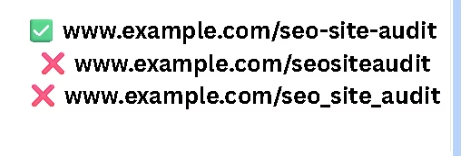
Hyphens (-) are the industry standard for separating words in a URL. They improve readability and ensure search engines interpret words correctly.
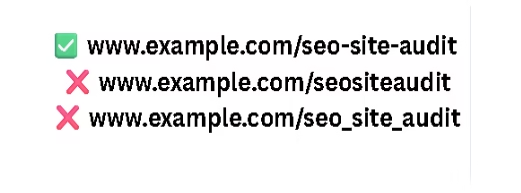
Why not underscores (_) or no separators at all? Because Google sees underscores as word connectors, not separators. That means seo_site_audit may be read as “seositeaudit” instead of “seo site audit.” Hyphens solve this problem.
A short, SEO-friendly URL improves user trust and rankings.”
Shorter URLs are easier to:
- Read in search results.
- Share on social media.
- Remember and type.
Long URLs full of random numbers, parameters, or extra folders not only confuse readers but can also dilute keyword relevance.
Studies have shown a correlation between shorter URLs and higher rankings. Short URLs are also more likely to be copied, pasted, and shared without being cut off.
Make URLs Enticing to Click
URLs aren’t just for search engines—they also appear in search results. A clean, descriptive, keyword-rich URL can increase your organic click-through rate (CTR), which is a known ranking factor.
When someone sees “best-laptops” in your URL, they immediately know what to expect, making them much more likely to click.
Stick With Lowercase
Some servers treat uppercase and lowercase URLs as different pages, which can cause duplicate content issues. Even if your server doesn’t, consistency matters.
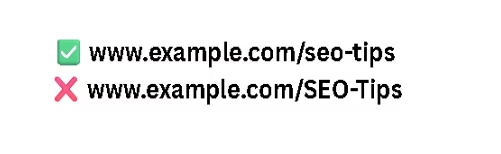
Keeping URLs lowercase avoids confusion, keeps your site neat, and follows best practices.
Avoid Dates in URLs
Many older CMS platforms automatically added dates to blog post URLs. While this may have made sense for news sites, it causes problems for SEO today.
why avoid dates
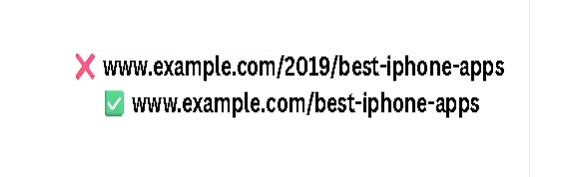
They make URLs unnecessarily long.
- They make content look outdated—even if it’s still relevant.
- They make updates harder. If you update “2019 apps” in 2025, the URL looks inconsistent.
- Unless your content is time-sensitive (like breaking news), keep dates out.
Use Organized Subfolders
Subfolders (like /blog/seo/) help both users and search engines understand where they are on your site.
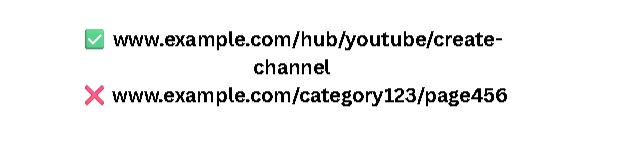
Good folder structure creates a logical hierarchy, improves navigation, and signals content relationships to Google.
But keep it simple: Too many folders can make URLs unnecessarily long. Two or three levels are usually enough.
Always Use HTTPS
HTTPS is not optional anymore—it’s the standard. It encrypts data, improves user trust, and is a confirmed ranking factor.
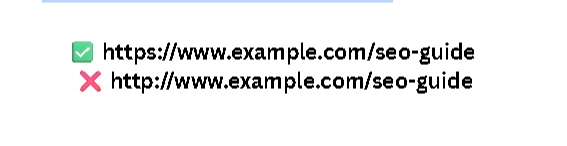
Google even labels non-HTTPS sites as “Not Secure” in Chrome. If your site is still on HTTP, switching to HTTPS should be your first priority.
Avoid Long Blog Post Titles in URLs
Letting your CMS auto-generate URLs from blog titles often results in long, cluttered URLs.
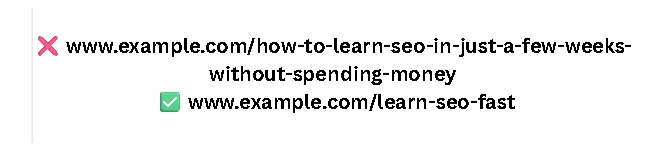
Instead of copying the entire title, shorten the URL to the main keyword or phrase. This keeps it clean, clickable, and SEO-friendly.
Avoid Dynamic URLs
Dynamic URLs often contain random parameters like ?id=123&utm_source=facebook. These can cause serious SEO issues, such as duplicate content, and they look untrustworthy to users

Always rewrite dynamic URLs into static, keyword-friendly versions.
Subfolders Are Better Than Subdomains
While both are valid, subfolders are generally better for SEO. Google often treats subdomains as separate websites, which can dilute your site authority.
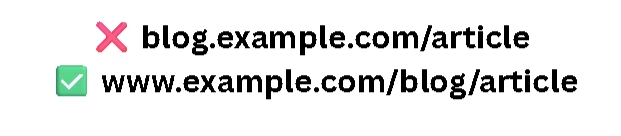
By using subfolders, you consolidate SEO signals under your main domain, making it stronger.
Here’s how to structure an SEO-friendly URL for blog posts.”
- Backlinko keeps URLs short and keyword-focused, like backlinko.com/seo-tools.
- PetSmart organizes its massive inventory with a clear hierarchy:
www.petsmart.com/dog/food/dry-food/blue-life-protection-formula.html - YouTube Marketing Hub uses /hub/youtube for structured navigation:
www.example.com/hub/youtube/create-channel
These examples prove that smart URL structures boost both user experience and search performance.
Final Thoughts
“Remember, every SEO-friendly URL helps your content perform better.”
Your URL structure may seem like a small detail, but it has a big impact on SEO. Clean, descriptive, and keyword-rich URLs can:
- Help Google understand your content faster.
- Improve your search rankings.
- Increase click-through rates (CTR).
- Build user trust.
- Make your website easier to navigate.
By following best practices—using keywords, keeping URLs short, avoiding dates, sticking with lowercase, choosing HTTPS, and avoiding dynamic parameters—you’ll create URLs that are optimized for both search engines and humans.
Remember: A great URL isn’t just about rankings. It’s about clarity, trust, and long-term scalability.
Faq’s
1. What is an SEO-friendly URL?
A short, clean, keyword-rich web address that’s easy for users and search engines to understand.
2. Why are URLs important for SEO?
They help Google identify page topics and influence whether users click on your link.
3. Should I use keywords in my URL?
Yes—adding a relevant keyword boosts clarity and relevance but avoid keyword stuffing.
4. Are hyphens or underscores better?
Use hyphens, since Google reads them as word separators for better readability.
5. How long should a URL be?
Keep it short and simple—easy to read, share, and rank better.
6. Should URLs be lowercase or uppercase?
Always use lowercase to avoid duplicate content issues and maintain consistency.
7. Why avoid dates in URLs?
Dates make URLs look outdated and harder to update over time.
8. Are subfolders better than subdomains?
Yes—subfolders consolidate SEO strength, while subdomains split authority.
9. Do I need HTTPS for SEO?
Yes—HTTPS improves trust, security, and is a confirmed Google ranking factor.
10. Why avoid dynamic URLs?
They look spammy, confuse users, and can cause duplicate content issues.